
Contextli vs Aqua Voice
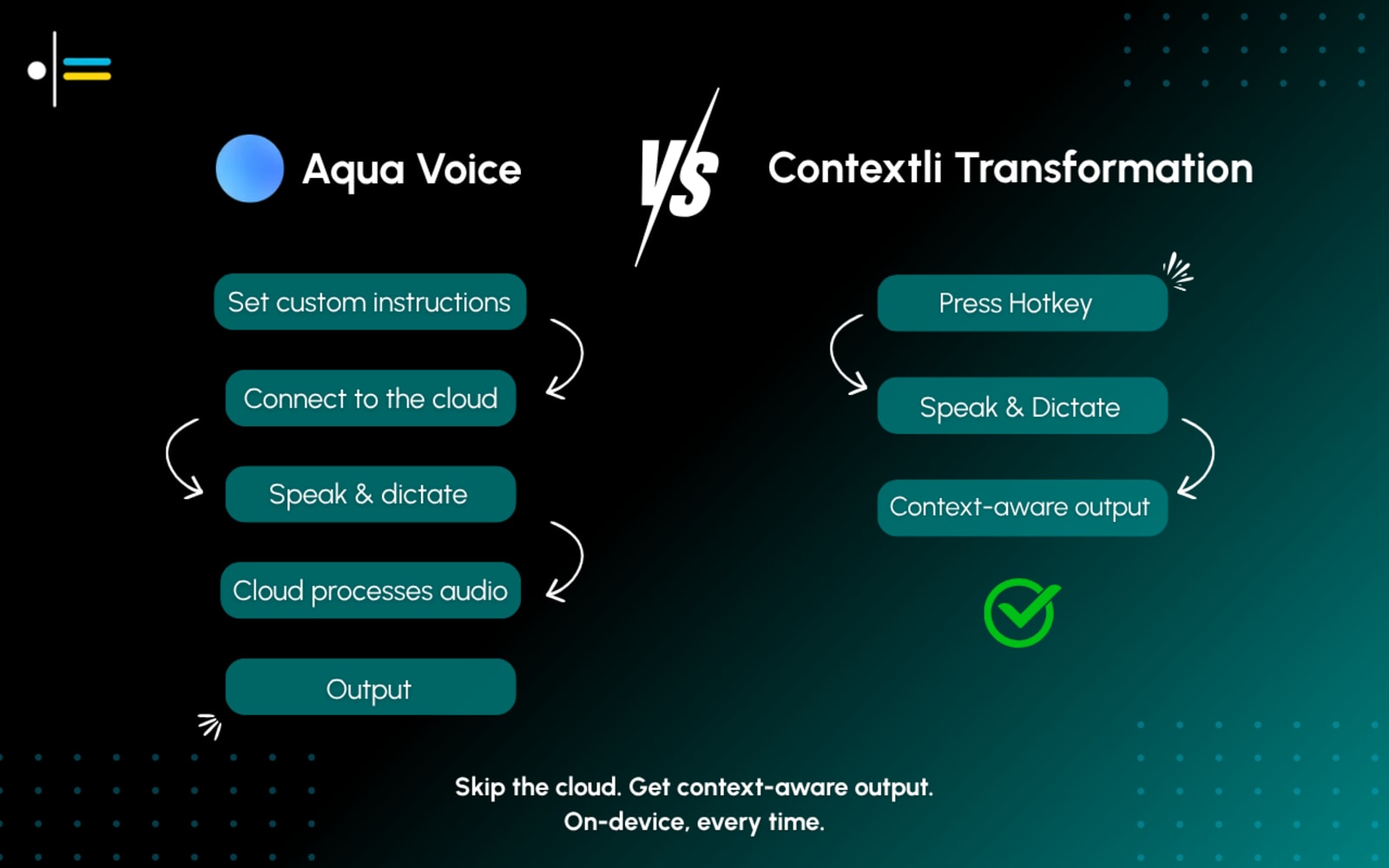
On-device, offline, and 25+ pre-built modes - Contextli's context-awareness is purpose-built for each app, not inferred from your screen.
Why people look for a Aqua Voice alternative
Cloud-based - your voice leaves your device
Aqua Voice reads your screen for context but sends audio to the cloud for processing. There is no offline mode. Contextli processes everything on-device.
No pre-built mode library
Aqua Voice uses custom instructions for formatting. There are no preset modes for Jira, Slack, Gmail, or GitHub. You write your own rules. Contextli ships 25+ ready-made modes out of the box.
No Android or Linux support
Aqua Voice runs on Windows, macOS, and iPhone. There is no Android or Linux client. Contextli covers all five platforms.
Context by screen reading - not by app mode
Aqua Voice reads what is on your screen to infer context. Contextli uses pre-built modes purpose-designed for each target app - meaning the output is shaped by explicit app conventions, not by whatever happens to be visible.
Contextli vs Aqua Voice - the full picture
Aqua Voice is a fast, screen-aware dictation tool that adapts to what's on your screen, and it now runs on Windows, macOS, and iPhone. Its processing is cloud-based. Contextli takes a different approach to context: 25+ pre-built, app-specific modes that format your speech automatically, all processed on-device and offline. If privacy, offline use, or ready-made app modes matter to you, Contextli is the Aqua Voice alternative to compare.
What is Aqua Voice? Aqua Voice is a fast, screen-aware dictation tool that adapts to what's on your screen, and it now runs on Windows, macOS, and iPhone. Visit www.aquavoice.com for their full story.
Contextli vs Aqua Voice
| Feature | Contextli | Aqua Voice |
|---|---|---|
| Context model | 25+ pre-built app modes | Screen-reading + custom instructions |
| Processing | On-device (offline capable) | Cloud-based |
| Pre-built modes | 25+ (Jira, Slack, Gmail…) | None - custom only |
| Offline | Yes | No |
| Platform | macOS, Windows, Linux, iOS, Android | Windows, macOS, iOS |
Contextli vs Aqua Voice
A clear, honest feature comparison.
| Feature | ContextliOur pick | Aqua Voice |
|---|---|---|
| Context / formatting | Yes25+ pre-built app-specific modes | PartialScreen-aware context + custom instructions (no preset modes) |
| Platform support | YesmacOS, Windows, Linux, iOS, Android | YesWindows, macOS, iOS |
| Processing & privacy | YesOn-device - voice stays on your computer | NoCloud-based - requires a connection |
| Offline support | YesYes | NoNo |
| Pre-built modes | Yes25+ modes (Bug Report, Standup, JSDoc, etc.) | NoNo preset modes - custom instructions only |
| Pricing | YesFree plan; paid from $9/mo (Starter) | YesFree Starter tier; Pro $8/mo (billed annually) |
Context / formatting
Contextli
Yes25+ pre-built app-specific modes
Aqua Voice
PartialScreen-aware context + custom instructions (no preset modes)
Platform support
Contextli
YesmacOS, Windows, Linux, iOS, Android
Aqua Voice
YesWindows, macOS, iOS
Processing & privacy
Contextli
YesOn-device - voice stays on your computer
Aqua Voice
NoCloud-based - requires a connection
Offline support
Contextli
YesYes
Aqua Voice
NoNo
Pre-built modes
Contextli
Yes25+ modes (Bug Report, Standup, JSDoc, etc.)
Aqua Voice
NoNo preset modes - custom instructions only
Pricing
Contextli
YesFree plan; paid from $9/mo (Starter)
Aqua Voice
YesFree Starter tier; Pro $8/mo (billed annually)
What actually makes the difference
A closer look at where Contextli and Aqua Voice diverge.
Two models of "context-aware"
Aqua Voice reads your screen in real-time to detect what you are doing and adapts output accordingly. Contextli takes a pre-built library approach: 25+ modes, each purpose-designed for a specific app (Jira, Slack, Gmail, GitHub, Notion, and more), activated automatically when that app is in focus. Different methods - both aiming for the same output.
On-device vs. cloud processing
Contextli processes voice locally using on-device Whisper models. Your audio never leaves your machine, and dictation works fully offline on paid plans. Aqua Voice is cloud-based: real-time screen context is useful, but it requires a connection and routes audio off-device. For users in sensitive industries - legal, medical, financial, or who work in low-connectivity environments, this distinction matters.
Pre-built modes vs. custom instructions
If you want to dictate a Jira bug report, Contextli has a 'Bug Report' mode ready to go - no writing prompts, no configuring. Aqua Voice's custom instructions are flexible for users who want to fine-tune their own rules, but there is no equivalent out-of-the-box library. Most users want to start dictating, not start configuring.
Which is more context-aware?
They measure context differently. Aqua Voice reads your screen dynamically. Contextli uses pre-built, app-specific modes - meaning each mode was designed specifically for its target app's conventions rather than inferred from whatever happens to be on screen. For the 25+ apps Contextli explicitly supports, output formatting is typically more precise.
Raw voice → structured, app-ready output
See how Contextli formats speech automatically for Aqua Voice's typical workflow, and beyond it.
Watch Contextli in action
Contextli recognizes Jira is the active app and applies the Bug Report mode - structured fields, proper labels, assigned severity. Context detected and formatting applied using a pre-built mode, not screen reading.
Where Aqua Voice is genuinely strong
We believe in honest comparisons. Here is where the competition has real strengths.
When Aqua Voice is still the better fit
Aqua Voice is a strong choice if you want dynamic, screen-reading context without choosing a mode manually. Its real-time screen awareness works well for apps Contextli hasn't pre-built a mode for yet. If you dictate across many varied or niche apps and want the system to figure out context on its own, Aqua Voice's approach is genuinely useful.
Why Contextli?
Aqua Voice is genuinely good at screen-aware context, but it's cloud-based, needs an internet connection, and uses custom instructions rather than ready-made modes. Contextli processes on-device and offline, and ships 25+ pre-built app-specific modes so formatting works out of the box. You also get broader platform coverage, including Android and Linux.
On-device privacy
Your voice stays on your computer. No cloud, no data sharing, and it works offline too.
25+ automatic modes
Pre-built app modes format your speech for Jira, Slack, Gmail, and more - no configuration required.
Every platform
Mac, Windows, Linux, iOS, and Android - the broadest cross-platform coverage in voice dictation.
Pricing
Free
100 credits/mo free forever. Paid plans from $9/mo.
from $8/mo
Free Starter tier. Pro $8/mo billed annually. No credit card required for free tier.
The honest take
Both tools are context-aware - they just implement it differently. Aqua Voice reads your screen dynamically; Contextli uses purpose-built modes for 25+ apps. Contextli adds on-device processing, offline support, and broader platform coverage. Aqua Voice's dynamic screen reading is useful for apps without a dedicated Contextli mode.
On-device, offline, 25+ pre-built modes, Android + Linux, precise app-specific formatting
Dynamic screen-reading context, no mode selection needed, simple free start
Contextli vs Aqua Voice - who should use which
- Contextli — privacy-focused users, offline workers, and anyone who regularly uses the 25+ apps with pre-built Contextli modes
- Aqua Voice — users who want dynamic context without picking modes, especially for less common apps that Contextli has not yet built a dedicated mode for
Frequently asked questions
Loved by people who talk faster than they type
Try Contextli free - no card required
See how context-aware voice dictation compares in your own workflow.
Free plan - no card required. Start dictating in minutes.