
Best Dictation Software for Mac
Apple Dictation (Fn key) is built in and accurate, but it formats nothing. Every Mac app gets the same raw transcription. Contextli reads your active app and formats what you say for it.
Last updated June 2026
Built-in Dictation: accurate transcription, zero formatting
The Fn key starts Apple Dictation instantly. But once your words land, you're on your own - no structure, no app awareness, and unreliable behaviour in browsers.
Unreliable in web apps
Apple Dictation behaves inconsistently in Chrome, Notion web, Gmail, and other browser-based tools. Triggering sometimes fails, and text occasionally drops.
No per-app intelligence
Pressing Fn in Notion looks identical to pressing it in Slack - raw words land in a heap. There is no mode system, no context detection.
Raw transcription only
You get your words back as spoken - no punctuation guidance, no structure, no filler-word cleanup. You edit manually every time.
Cloud processing by default
Unless you are on Apple Silicon with Enhanced Dictation explicitly enabled, macOS sends audio to Apple servers. Privacy-sensitive content goes off-device.
Contextli vs Apple Dictation
Apple Dictation is free and fast to trigger. The gap opens the moment you need structured output for a specific app.
| Feature | ContextliOur pick | Apple Dictation |
|---|---|---|
| Context-aware app formatting | YesFormats output for Notion, Slack, Gmail, Jira, and 25+ apps | NoRaw transcription only - identical in every app |
| Works in web apps (Chrome, Firefox) | YesReliable in any browser tab | PartialInconsistent - often fails in browser-based apps |
| Pre-built app modes | YesReady-made profiles for 25+ popular apps | NoNo mode system - no app-specific library |
| On-device / privacy-first | YesAudio never leaves your Mac | PartialOn-device on Apple Silicon; cloud is the default on older Macs |
| Works on Windows & Android | YesFull support across all major platforms | NoApple devices only |
| AI cleanup (filler words, grammar) | YesAutomatic filler-word removal and grammar cleanup | PartialBasic auto-punctuation only |
| Free to use | PartialFree plan available; Pro from $9/mo | YesFree - built into every Mac |
Context-aware app formatting
Contextli
YesFormats output for Notion, Slack, Gmail, Jira, and 25+ apps
Apple Dictation
NoRaw transcription only - identical in every app
Works in web apps (Chrome, Firefox)
Contextli
YesReliable in any browser tab
Apple Dictation
PartialInconsistent - often fails in browser-based apps
Pre-built app modes
Contextli
YesReady-made profiles for 25+ popular apps
Apple Dictation
NoNo mode system - no app-specific library
On-device / privacy-first
Contextli
YesAudio never leaves your Mac
Apple Dictation
PartialOn-device on Apple Silicon; cloud is the default on older Macs
Works on Windows & Android
Contextli
YesFull support across all major platforms
Apple Dictation
NoApple devices only
AI cleanup (filler words, grammar)
Contextli
YesAutomatic filler-word removal and grammar cleanup
Apple Dictation
PartialBasic auto-punctuation only
Free to use
Contextli
PartialFree plan available; Pro from $9/mo
Apple Dictation
YesFree - built into every Mac
Dictation Software for Mac - All Options Compared
Compare free and paid options - from built-in macOS tools to AI-powered dictation software with app-specific formatting.
Contextli
Free plan + paid from $9/moBest for professionals who need formatted output across all their apps.
macOS Dictation
Free (built-in)Good for basic dictation, but no formatting intelligence.
Wispr Flow
Free tier; Pro $12/mo (annual)Polished and accurate, but cloud-only with no offline mode.
MacWhisper
Free tier; Pro €59/~$69 one-timeBest for transcribing audio files, not live dictation.
SuperWhisper
Free tier; Pro $8.49/mo or $249.99 lifetimePrivate and capable, but you set up modes manually.
Dictate in any Mac app, and every web app where Apple Dictation struggles
Apple Dictation is reliable in native macOS apps. Contextli goes further: it works in any browser-based tool and formats per app automatically.
Web apps in Chrome & Safari
Notion web, Gmail, Linear, Figma comments - Contextli works in every browser tab where Apple Dictation is unreliable.
Apple Silicon optimised
On M-series Macs, on-device transcription runs via CoreML. Faster, cooler, and fully offline - your voice never leaves the machine.
Slack & Notion
A Slack reply gets a conversational tone. A Notion entry gets structured bullets. Contextli matches the format to the app.
Privacy-first by default
No audio is sent to any server by default. Mac users who care about privacy get on-device processing out of the box.
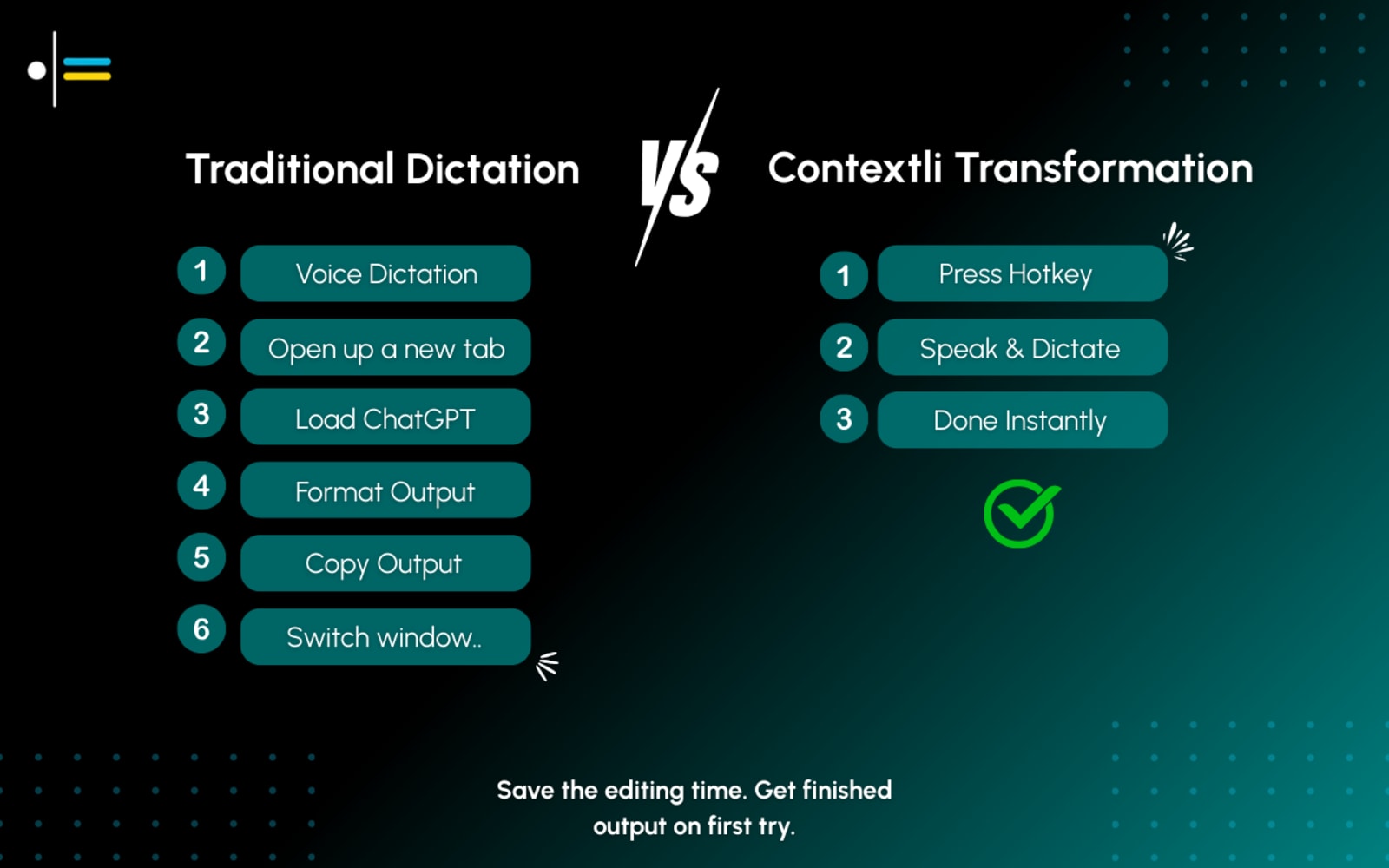
Apple Dictation output vs Contextli-formatted Mac output
Contextli formats your spoken words for whichever Mac app you are writing in - no cleanup, no copy-paste juggling.
How to set up dictation software on your Mac
Download Contextli for macOS from contextli.com
Visit contextli.com and download the Mac app. Open the .dmg file and drag Contextli to your Applications folder. No account needed for the free plan.
Grant Microphone and Accessibility permissions
macOS will prompt for microphone access and Accessibility permissions (so Contextli can detect your active app). Grant both in System Settings - Privacy and Security.
Press Option+Space in any app or web app
Whether you are in Notion, Slack, Gmail in Chrome, or any other app, press Option+Space. Contextli reads your active window immediately.
Speak naturally - context-aware formatting is automatic
On Apple Silicon Macs, transcription runs entirely on-device. Your voice stays on your machine. Contextli formats your output for the specific app you are using.
Your words land formatted and ready
Notion gets a structured entry, Slack gets a conversational reply, Gmail gets a professional email. No editing required.
The Honest Take
Apple Dictation is accurate and costs nothing - it is a perfectly good tool for the occasional quick phrase in a native macOS app. The gap shows when you start writing in web apps, when you need structured output, or when you want your Notion entry to look different from your Slack reply. Contextli fills that gap by reading your active app and formatting your words accordingly.
App-aware dictation for every Mac app and web app. Privacy-first on Apple Silicon.
Free, accurate, and always on Mac, but identical output regardless of which app you are writing in.
Which Mac dictation tool is right for you?
- Apple Dictation — occasional quick phrases in native macOS apps - free, instant, and no setup
- Contextli — Mac users who dictate into web apps, Notion, Slack, and Gmail and need each output formatted for the app they are in
- MacWhisper — transcribing existing audio files and recordings - not live cursor dictation
- SuperWhisper — Mac users who want on-device privacy and are comfortable setting up formatting modes themselves
- Wispr Flow — Mac users who want polished cloud dictation with tone adjustment and do not need offline mode
Frequently Asked Questions
What Mac users say
Try Contextli on Mac
Free plan - no card required. Works in every Mac app and web app, with Apple Silicon support.